Wednesday, May 04, 2022

How to Find Duplicate Images on a Mac or Linux Machine

This is how to search recursively all directories on a Mac or Linux machine for duplicate images with a single line of awkward bash script. This method will find duplicates anywhere on your disk below your current directory (try "~"), and find multiple versions.

Many commercial products exist to easily find and delete duplicate images like those reviewed here, but if you are like me, and don't like to download apps willy nilly for a single task, and have a bit of shell scripting experience, you can use the following line of tortured bash script to find duplicate files.

find . -type f \( -name "*.jpg" -o -name "*.gif" \) | awk '{print "\"" $0 "\""}' | xargs shasum -a 256 | sort > checksumAndFilename.tmp && cat checksumAndFilename.tmp | awk '{print $1}' | uniq -D | uniq > checksum.tmp && grep -f checksum.tmp checksumAndFilename.tmp | tee duplicates.tmp && echo "output in \"duplicates.tmp\"" && rm checksumAndFilename.tmp checksum.tmp

The basic idea is to search the current directory and all subdirectories for images files, calculate a hash for each file, then sort the hashes and then list adjacent hashes, which would be duplicates. (If this is too much for your brain, just go to imymac and buy an app.)

Ok, let's go through the command in detail.

  1. Get all the image files in your directory and below. Update "*.jpg" to "*.png" or whatever you need.

    find . -type f \( -name "*.jpg" -o -name "*.gif" \)

  2. Surround the file name with double quotes, since some people still insist on the horrible, dasterdardly, awful practice of including spaces in names.

    awk '{print "\"" $0 "\""}'

  3. Pipe the names of the files into shasum to generate a hash

    xargs shasum -a 256

  4. Sort by the hash value so duplicates will be adjacent and write to a temp file

    sort > checksumAndFilename.tmp

    checksumAndFilename.tmp looks like this. The files with the same hash value would be duplicates.

    ff45b77226369d27b67772e72dfe8dc3387eff06  ./2010-07-04-2224-July4_036.jpg
    ff65e3611973092e61127439af6b3c82d0ee055a  ./2010-12-29-1408-IMG_9638.jpg
    ff680170b0451868a1bda027c801b78f55067366  ./2010-12-24-1010-IMG_9235.jpg
    ff918f6f8230deb3cd2208602dadb5c6f88039dc  ./2010-03-14-2025-IPhone_8146.jpg
    

    We are almost done, but how to only see hash values that are duplicates?

  5. Get only the hash values that are duplicates

    cat checksumAndFilename.tmp | awk '{print $1}' | uniq -D | uniq > checksum.tmp

  6. checksum.tmp looks like this. This are only the hash values that are duplicated.

    0526e5586cc1e4d2d97e5cc813c8d9b698bc3df2
    075a137c8857c8b38555cf632d906ed0581b9224
    
  7. We have only the duplicated hash values. Let's match the hashes back with their filenames

    grep -f checksum.tmp checksumAndFilename.tmp

  8. We can see the first two are duplicates, and the next two are as well.

      
    0526e5586cc1e4d2d97e5cc813c8d9b698bc3df2  ./2010-11-28-0926-IMG_0300.jpg
    0526e5586cc1e4d2d97e5cc813c8d9b698bc3df2  ./IMG_0300.jpg
    075a137c8857c8b38555cf632d906ed0581b9224  ./2010-06-08-photoshoot012.jpg
    075a137c8857c8b38555cf632d906ed0581b9224  ./2010-06-08-photoshoot_012.jpg
    
  9. Write to the output file and the screen

    tee duplicates.tmp

  10. Let's remind ourselves where the output lives

    echo "output in \"duplicates.tmp\""

  11. Clean up our mess

    rm checksumAndFilename.tmp checksum.tmp

My gut tells me there's some ways to clean this script up. Please add a comment if you can improve the script.

Tuesday, March 15, 2022

How to Find IPhone's Unread Messages

 My IPhone has been declaring I have 1 unread message, but I can't find it.


The solution was actually easy.

 "Hey Siri, read me my unread messages." 

Siri read my one message and closed it.

Monday, March 14, 2022

Is Silver or the S&P 500 a Better Investment?

 Back in 1979 some friends of mine in Dallas were really into buying silver, as in pre-1965 silver quarters. They firmly believed the US financial system was on the verge of collapse due to congressional overspending. The US dollar would be worthless due to runaway inflation and the silver coins would be worth a fortune and be the de facto currency.


As a poor college student I didn't have much money to sock away in silver, but I bought 6 silver quarters which equals a little more than 1 troy oz of pure silver.

Was that a good investment?  Let's see. In 1979, silver was about $11. per oz.

This year, 2022, my ounce of silver is worth $24.

What if I'd invested that $24 in the S&P 500 in 1979? The index has risen 12% on average since 1979, so my stocks in 2022 would have a value of $3,120.

So, $24 from silver or $3,120 from the stock market? You decide.


Sunday, March 06, 2022

What does Google know about me?

I just updated my advertising profile at Google. It's easy.

Visit  https://adssettings.google.com/ and you'll see something like this:


You can click on subjects and remove them from your ad lineup. I removed "cats", but kept "dogs".

Wednesday, January 26, 2022

Free Online HTML Validator for an Entire Site - Datayze.com

I recently retired from 42 years of software development and have a little more time to work on my personal website, https://www.fincher.org. 
I've been working on it for almost 30 years and some parts are a little, ... , crusty shall we say?

I found a wonderful online free website analyzer from the good folks at Datayze.com that will gently scan an entire website and show areas that need fixin'.

Thanks Datayze.com!


Saturday, January 02, 2021

Best Remote Ftp Client for the Mac

 I've been updating my website fincher.org, and needed a remote ftp client to access my dreamhost linux server. After some research I settled on CyberDuck. It's awesome! Did I mention it's free?


Saturday, December 26, 2020

Best Electrical Rates in Texas - How to Select an Electrical Provider 2020

 In Texas we have the luxury (duty?) to select an electrical provider and a plan. We have   http://powertochoose.org/, the official website of the Public Utility Commission of Texas to help Texans select a provider and a plan.


From the site we can get a general idea of the price of power, but not a detailed analysis of what the yearly cost would be because electric companies may charge different rates depending on how much electricity we use each month.

For example suppose company A charges 5 cents for all electricity under 1000 KiloWattHours (KWH), and then 15 cents for any KWH over 1000; and company B charges 15 cents for all electricity under 1000 KWH, and then 5 cents for any KWH over 1000. We have to do some math to figure out what works best for our usage. Here's an example from Green Energy Exchange's rates:


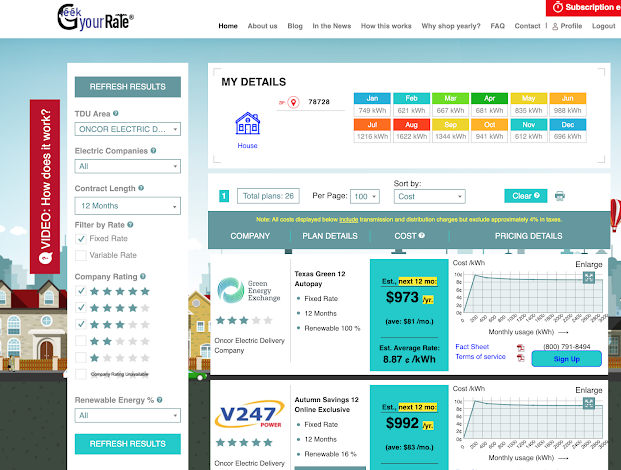
I use GeekYourRate.com/ to do the math for me. The site charges $9.95 to take my monthly usage and crank through all the plans to find the best ones for me. Usually I use less than 1,000 KWH, but for three months in the summer, I go a little above 1,000 KWH. Here's the page using my usage:


GeekYourRate recommended Green Energy Exchange as the cheapest option. I tried their website, but it would never let me proceed beyond the review button - it was always greyed out no matter what I tried. 

So I went to the next company, V247. Their website worked and I enrolled.

I like  GeekYourRate.com/ since it does all the math for me and can save me hundreds of dollars a year.