Thursday, June 21, 2012

Pictures from Paul Hammant at Austin IEEE, June 20, 2012 "Client Side MVC"

Paul Hammant, co-developer of Selenium, from ThoughtWorks, spoke to Austin's IEEE chapter June 20th, 2012 on the topic of "Client Side MVC". Here is a summary of my jumbled notes:
  • Lots of job openings are available in Austin.
  • Developers using ClientSide Model-View-Controller frameworks are more productive.
  • The original framework, backbone.js, has lots of competitors.
  • Paul liked AngularJS (made by Google employees in their 20% time) for open source projects and Knockout (made by Microsofties in their off-time) for Microsoft environments.
  • DoubleClick uses AngularJS for their commercial site.
  • http://addyosmani.github.com/todomvc/ has demos of the ClientSide MVC frameworks.
  • CSMVC allow for rapid prototyping.
  • CSMVC offers massive code reduction.
  • Paul thinks Knockout will be an official component in the Microsoft toolbox in the future.
  • "Java and .Net developers need to get involved with JavaScript or get left behind like COBOL programmers."
  • JSON is the Browser Lingua Franca now.
  • JSFiddle.com offers a good tool.
The drumbeat of JavaScript is starting to be deafening. Update: Slides are here.

Tuesday, May 29, 2012

Canoscan 8800F Scanner and Vertical Streaks

I've spent hours trying to remove vertical streaks and stripes from scanned images from my Canoscan 8800F Scanner. In an effort to save others my time, here's the problem and solution.
The problem image:

The solution image:

Canon email help was somewhat helpful, although they never solved the problem. To fix the vertical artifacts I had to lie to the scanner and tell it these were "Color Photos" instead of "Black and White Photos". Then everything worked fine. Must be some bug in the Black and White image processing algorithm.

Monday, May 28, 2012

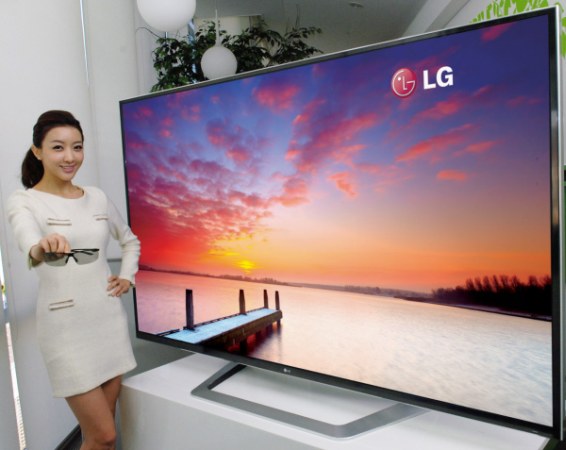
Move over 1080p, 4K is on the way

Just when you were getting smug with your 3D 1080p video display, the International Telecommunications Union (ITU) just adopted specs for the next generation of video called "Ultra High Definition Television", UHDT.

The new spec comes in two flavors, 4K and 8K. 4K means the pixel count is 3,840 x 2,160 giving 8 megapixels per screen, instead of today's 1,080 x 1920 pixels which has 2 Megapixels. The 8K version packs 32 megapixels. This will be wonderful.

Already Peter Jackson and others are shooting in this new format. Get ready to re-buy all your favorite movies - again and start saving up for that new 4K screen.

But where will the madness end? I'll tell you. 576 megapixels. That's the estimated resolution of what the eye can really detect. Doing a little math for a 16x9 ration screen, [(16x)(9x) = 576Megapixels, solving for x gives us 2Megapixels] yields a screen 32Meg by 18Meg.

But, ultimately we will use individual glasses where an image is directly written to each retina by a tiny laser giving us crisp perfect 3D pictures. Yeah, lasers writing to our eye balls, creepy, but get over it - it's the future.

Wednesday, May 23, 2012

Google - u so awesome

I was trying to bring up the Chrome browser using "Launchy" (which is a must for Windows systems), but my right hand was over one letter to the right, so although I tried to type "chrome", it came out "cjrp,e" instead. Launchy didn't understand "cjrp,e" so it forwarded me to Google, which much to my delight, actually understood and showed results for "chrome". Amazing. Thank you Google - u so awesome. (Curious, I asked bing and it showed me a page for CJRP, a French-language Canadian radio station.)

Saturday, May 19, 2012

Google AdSense Report Thinks I'm Using an Unsupported Browser

When I visit the AdSense reporting site in FireFox, AdSense thinks I'm using an unsupported browser (the source html even recommends downloading a version of FireFox newer than 3 (but I'm using 12.0)). AdSense shows me a really scaled down report version designed for mobile. The problem turns out to be "Ad Block Plus". It is interfering with the Google's browser detection. To turn off "Ad Block Plus" in FireFox, select "Tools/Ad Block Plus/Disable on Google", then you will get the full richness of the amazing reporting from AdSense.

Tuesday, May 01, 2012

HTML5 excanvas "Object doesn't support this property or method"

I'm building a little HTML5 practice page at www.MyDoodleDot.com and was having problems getting "excanvas", the shim for using the HTML5 canvas element in older IE browsers. In my HTML I included the conditional running of the excanvas shim with this:
<!--[if lt IE 9]><script type="text/javascript" src="excanvas.compiled.js"></script><![endif]-->
But when IE got to the second line below, it would die with "Object doesn't support this property or method".
    var canvas = document.getElementById("mycanvas");
    var context = canvas.getContext("2d");
The problem was that excanvas.js had not been fully loaded, so when IE hit that line, the canvas object didn't have a "getContext()" method. This happened because I was using this to start my javascript,
$(document).ready(letsStart);
The "ready()" method kicks off when all the DOM has (pretty much) loaded, but excanvas.js still wasn't loaded. The solution was to replace "$(document).ready(letsStart);" with
window.onload = letsStart;
Then my canvas app started working fine with an old version of IE.
BTW, my five year old daughter made this with www.MyDoodleDot.com

Monday, April 30, 2012

Making Contact Sheets with "montage"


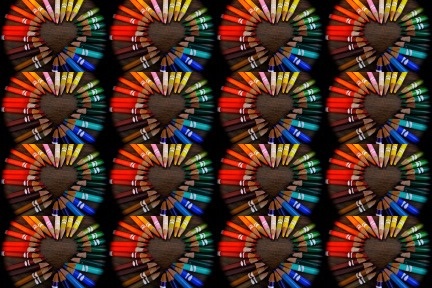
Being very cheap, er,..., I mean frugal, and wanting to get a bunch of small pictures printed on real photo paper that I could slice into tiny 1 inch by 1.5 inch smaller-than-wallet photos, I used the open source, free "montage" program in the ImageMagick suite of tools on windows XP to create a contact sheet with this command:
montage pencil.jpg pencil.jpg pencil.jpg pencil.jpg pencil.jpg ^
pencil.jpg pencil.jpg pencil.jpg pencil.jpg pencil.jpg pencil.jpg ^
pencil.jpg  pencil.jpg pencil.jpg pencil.jpg pencil.jpg ^
-tile 4x4 -geometry +0+0  -border 0 -rotate -90 pencils.jpg
(Surely there's a way to not repeat "pencil.jpg", but I was in a hurry.) The source photo, in this case "pencil.jpg", needs to be 1 inch by 1.5 inches which will reproduce 16 times on a standard 4x6 inch photo. This is great if children want to give others a small picture of themselves.